
An LLM is a language model: a program that continues text. You write the start, it picks the most plausible continuation. That is how the chat assistants you are used to work. We put four such models on an ordinary VPS with 2 cores and 4 GB of memory and no graphics card, and watched what happens: how much memory they take, how fast they answer and, above all, how often they are wrong. One of the models simply would not fit.
What an LLM is, in plain words
Picture a phone keyboard that suggests the next word. Now imagine it has read millions of pages and suggests whole paragraphs instead of single words. That is an LLM. It does not look the answer up in a database and it does not "know" countries and dates: it picks the continuation that most often followed similar text.
That gives you the one property to grasp before anything else: a plausible answer and a correct answer are not the same thing. A model can write smoothly and confidently and still be wrong. You will see it below on real examples.
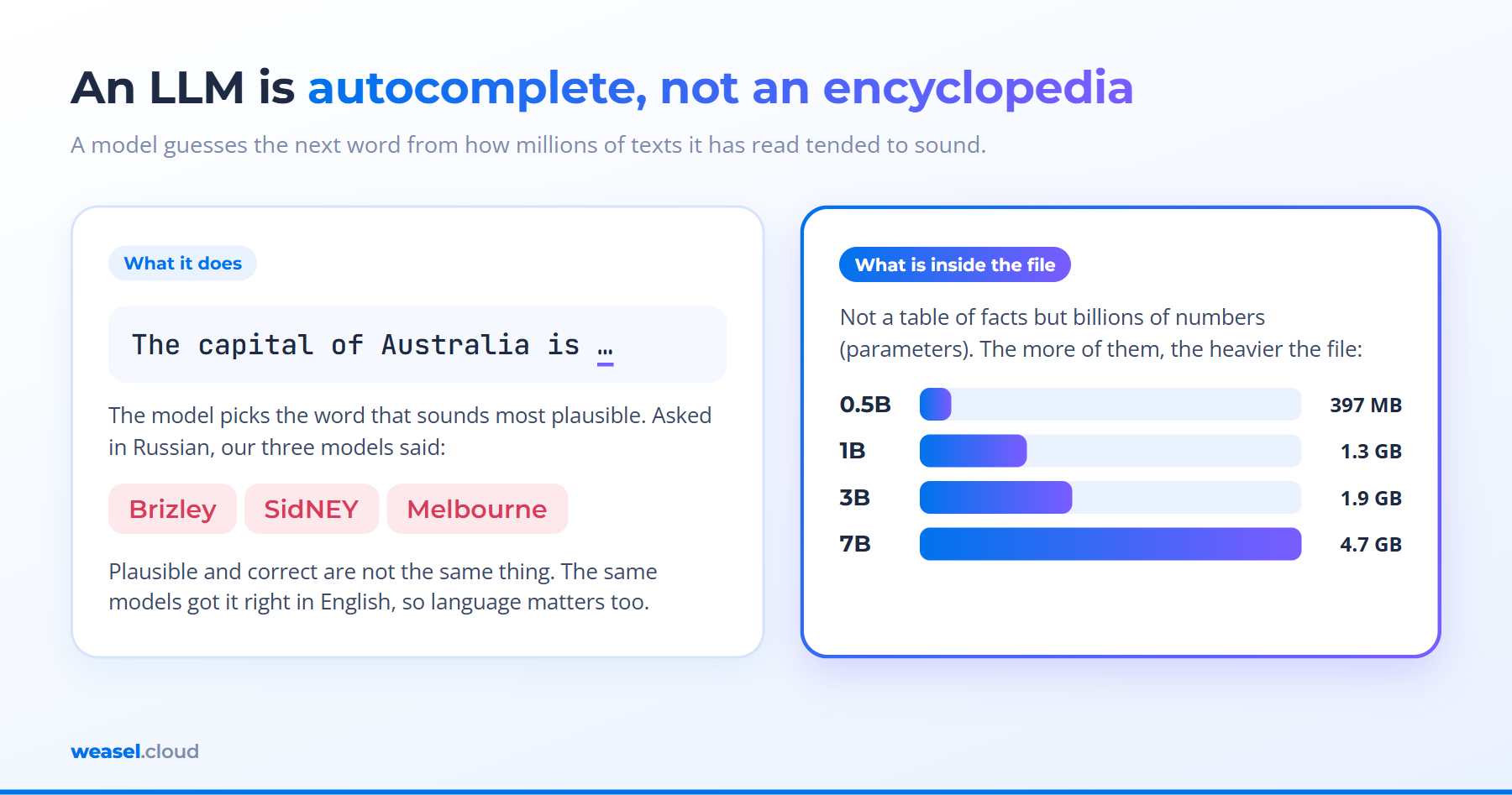
Two terms you will meet again. Parameters are the numbers inside the model that hold everything it has learned. They are counted in billions: "3B" means roughly 3 billion. The more parameters, the heavier the file and the more memory it needs. A token is a piece of a word that the model works with; its answer speed is measured in tokens per second.
What you need to run an LLM on your own server
Three resources, and they matter in different ways.
- Memory is the main one. The whole model is loaded into RAM. If memory runs out, the Linux kernel kills the process and you get no answer at all. It is not "it gets slower", it is "it does not work".
- The processor sets the speed. With no graphics card the CPU does the maths, and the bigger the model, the slower the text appears.
- The disk is just room for files. Models sit on disk and are read at load time. Disk speed affects start-up, not the answer.
A rough memory estimate from our measurements: a model takes about as much memory as its file weighs (within 0.1 GB in our runs), and the idle system itself took 0.4 to 0.6 GB. Add headroom for the conversation text: the longer the prompt, the more memory it grows.
The experiment: four models on a VPS with 2 cores and 4 GB
We used a Weasel VPS with 2 vCPU, 3.9 GB of memory and Ubuntu 24.04, with no graphics card. Ollama, a program that downloads models and runs them, installs with a single command. The installer itself warned that there is no GPU and that everything would run on the processor:
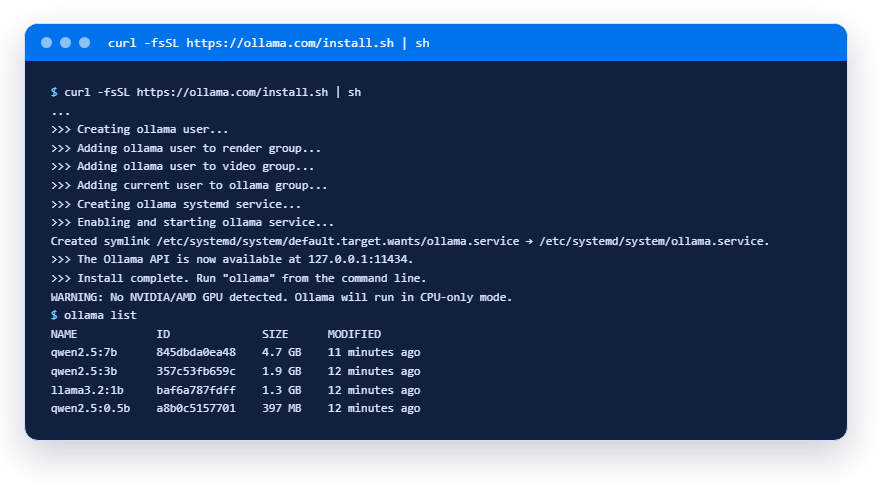
We downloaded four models, from 0.5 to 7 billion parameters. Each got the same set of questions, and we recorded the memory it took and how many tokens a second it produced:
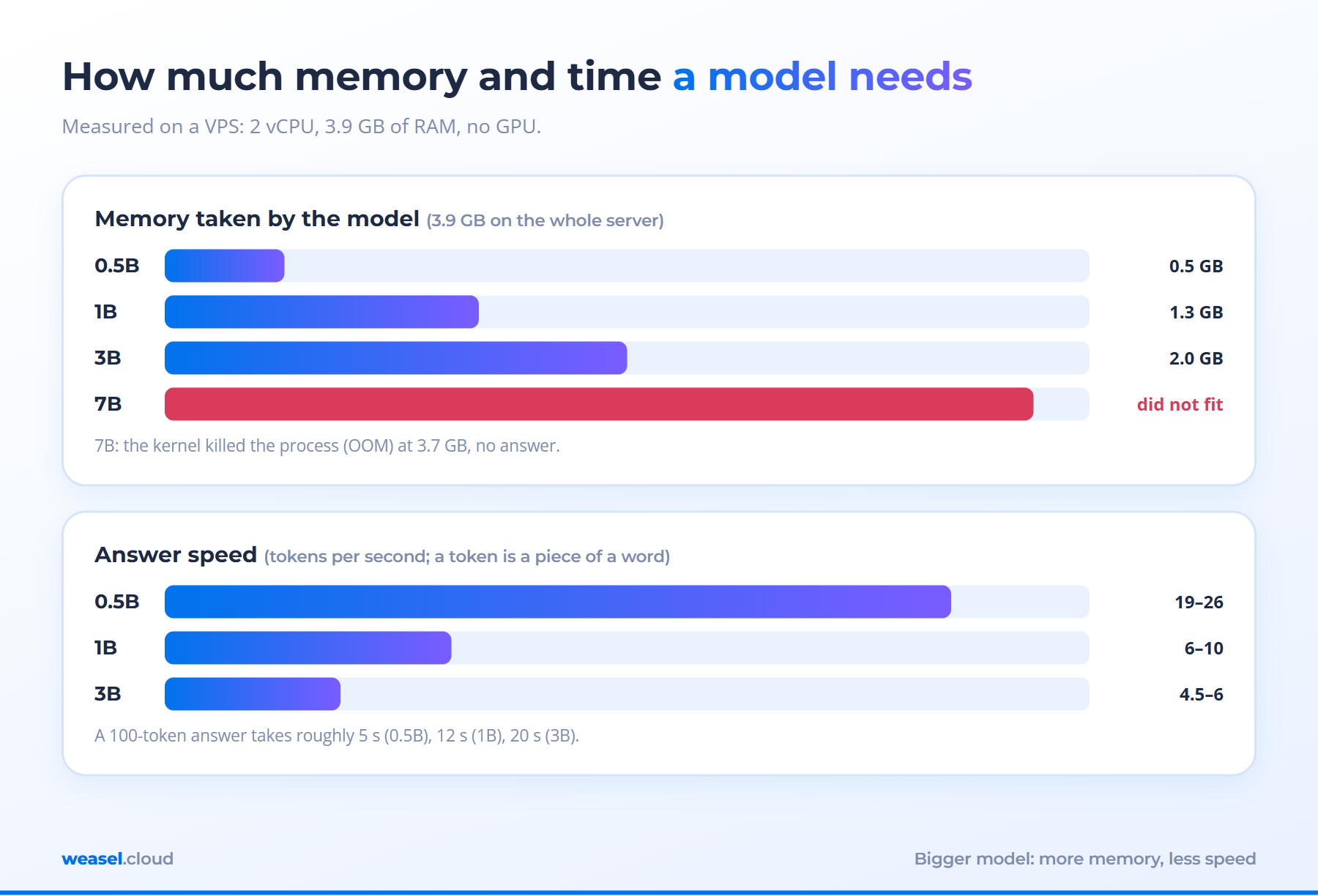
The pattern is predictable: a bigger model means more memory and less speed. Speed roughly halves at every step. In the English run it was 19 to 26 tokens a second for 0.5B, 6 to 10 for 1B and 4.5 to 6 for 3B. A 100-token answer takes about 5 seconds on the smallest model and about 20 on 3B.
The 7B model did not fit
The 7-billion-parameter model weighs 4.7 GB and the server has 3.9 GB of memory. We tried anyway. The result:
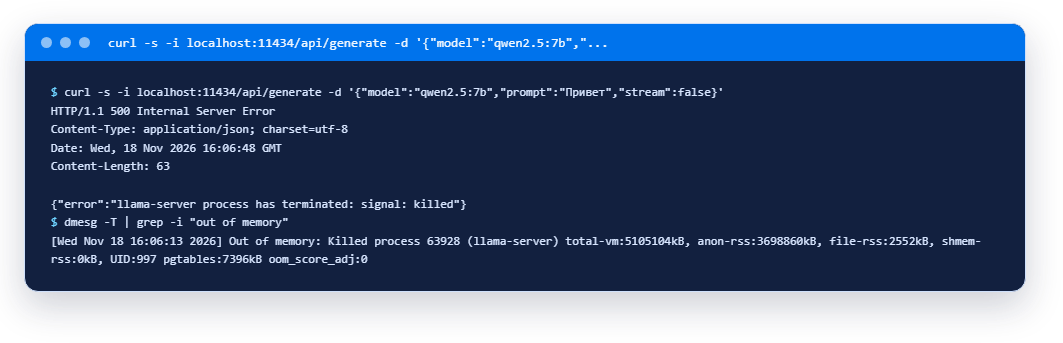
No answer: the server returned error 500, and the system log shows the kernel killed the model's process after it had grown to 3.7 GB. This is the "no memory, no model" rule in action. The model file has to fit in RAM with room to spare. For a 4.7 GB file, rent a server with headroom: 8 GB or more.
What the models answered: all of them slip
We asked each model five questions. Three came from memory ("capital of Australia", "what is 17 times 23", "what is swap in Linux"). Two were tasks where the answer sits inside the prompt: a short email about a meeting time and five lines of a web-server log, where the job was to find the address with the most 404 responses.
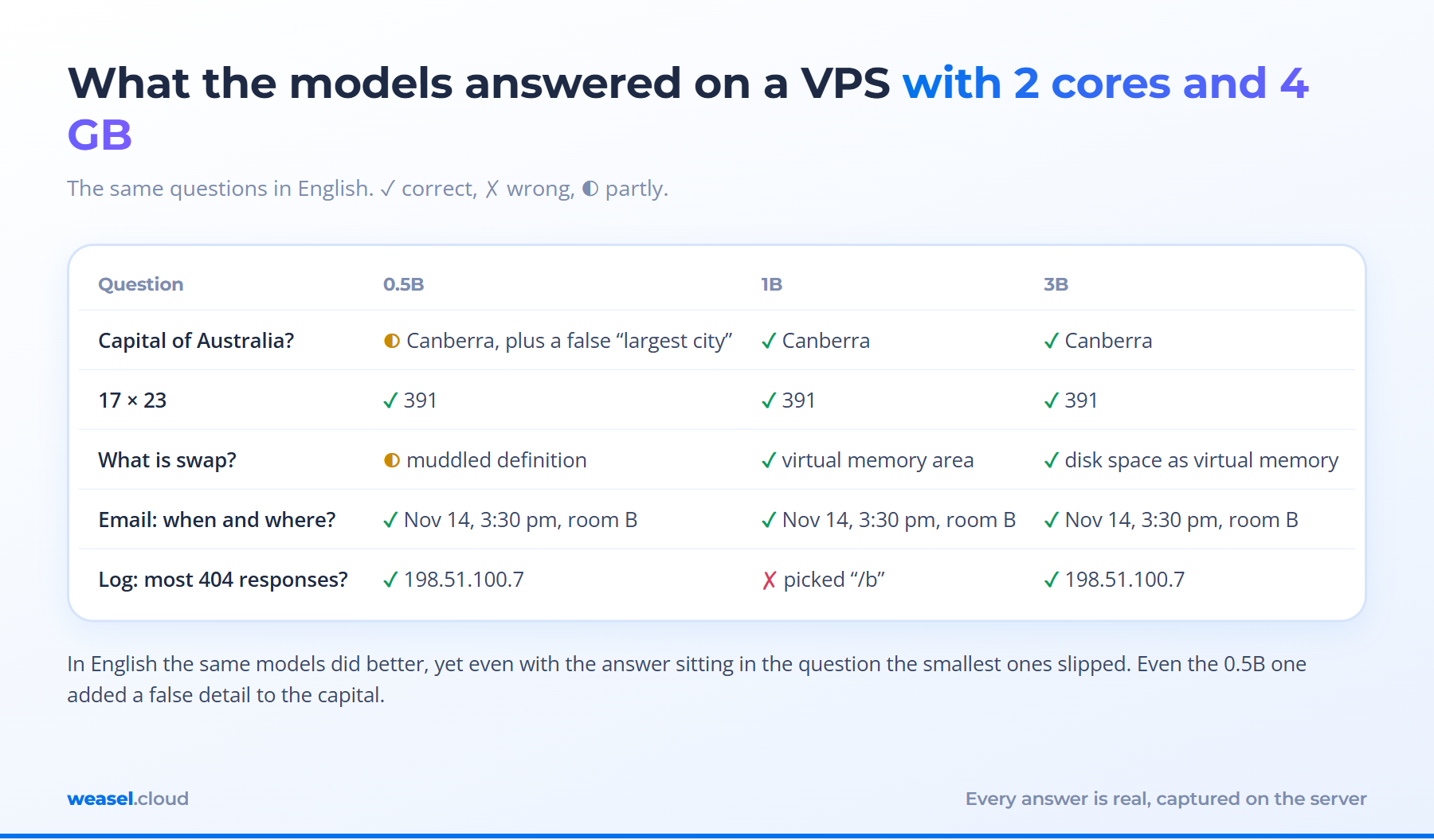
What it shows.
- English helps a lot. The table is the English run, and all three models named Canberra (the smallest added a false detail, calling it the "largest city"). When we asked the same models in Russian, they answered "Brizley", "SidNEY" and "Melbourne", and the 3B one even looped: "The capital of Australia is Melbourne. But that is wrong. The capital of Australia is Melbourne." If your texts are not in English, test the model in your own language.
- Arithmetic worked for all. Every model answered 17 times 23 with 391, in English and in Russian.
- Size does not guarantee quality. In the log task the smallest and the largest model found 198.51.100.7 (two 404 responses against one for 203.0.113.5). The 1B model in the middle answered "/b", a file path, not an address. In Russian the order flipped: the smallest was right and the 3B model named the wrong address.
- Definitions can be muddled. On swap the smallest model produced a vague, half-wrong definition, while the 1B and 3B ones got it right (disk space used as virtual memory).
What such a model is good for
Not as an encyclopedia. But it can work with text that you give it, provided you check the result afterwards:
- sorting and tagging incoming emails and requests;
- short summaries of long text, so you can decide whether to read the original;
- draft replies that you edit before sending;
- pulling dates, names and amounts out of text into a table (with spot checks).
These tasks usually go better with a larger model and a shorter text, but not always: in our Russian test the smallest model solved the log task and the 3B one did not. Each still needs a check: we just watched a model "read" an email in Russian and invent a city.
Do you need your own VPS for an LLM
A server of your own is about control, not about getting smarter answers. It wins in three cases: texts must not go to an outside service (contracts, client correspondence, internal instructions); the tasks are simple and repeat; you need your own endpoint that scripts and bots can call. It loses where you need strong language skills, exact facts and chat speed: on 2 cores an answer arrives in seconds or minutes, not instantly.
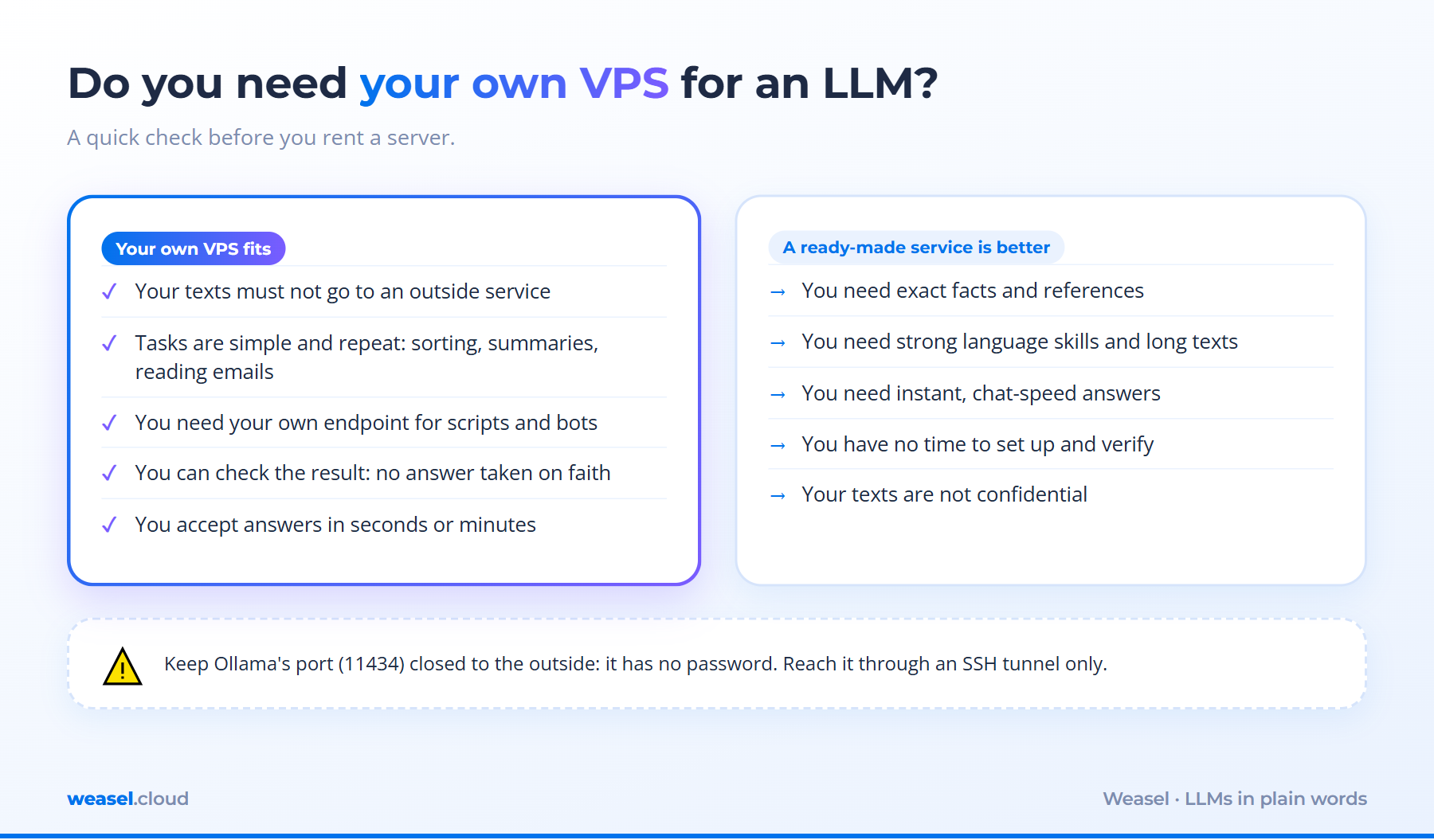
If you decide to try: start with a model of 1 to 3 billion parameters and a server with 4 GB, as we did. If 1B falls short, try 3B, though it does not guarantee better quality; anything bigger than 3B needs 8 GB and up. And decide in advance how you will check the answers: without a check, such a model errs silently.
Security: close the port
Ollama has no password. It listens on 127.0.0.1:11434, so it is reachable only from the server itself. Leave it like that. If you need access from another computer, forward the port through an SSH tunnel instead of opening it to the world, or strangers will run your model on your processor.
FAQ
Is a VPS with 1 GB of memory enough?
By our numbers the smallest model (0.5B) together with the system takes about 1 GB, so a 1 GB server leaves no headroom. We did not test it. For 1B and up, take at least 4 GB.
Do I need a graphics card?
No, our measurements were made without one: Ollama switched to the processor on its own. A graphics card makes answers faster, but an ordinary VPS has none, and small models work without it.
Can I "teach" the model on my own documents?
Training a model on a VPS with no graphics card is impractical. A different approach is usually enough: find the relevant pieces of your documents and put them into the model's prompt. It is called retrieval-augmented generation (RAG) and it suits a small server too.
Which model should I pick?
We have no universal answer: we tested three small models on five questions, which is not a ranking. Take two or three models of a suitable size and run your own typical questions, because results differ a lot from task to task.
What to remember
- An LLM picks a plausible continuation of text; it does not look facts up. It is wrong with confidence.
- Memory is the main resource: the model must fit in RAM with room to spare, or the kernel kills the process.
- A VPS with 2 cores and 4 GB runs models up to 3 billion parameters at roughly 5 to 25 tokens a second.
- For references and exact facts use a ready-made service. A server of your own pays off for privacy and simple repeated tasks.
- Always check the output, and keep Ollama's port closed.
Read next

Network9 November 2026
How to choose a VPS country for AI tools: ChatGPT, Claude, Gemini and APIs

Resources6 November 2026
What is a VPS: how a virtual server works and what it is for, in plain words
Network4 November 2026
What Is a DNS Server: How DNS Works, How to Check It and What to Do When It Does Not Respond
Deploy a server in 1 minute
Choose a location and a plan in the client area. The server starts automatically after payment.