
You are putting a bot on a VPS that calls ChatGPT, Claude or Gemini, and you want to know which country to pick for the server. The short answer: the service sees the IP address of the server, not you, and most European countries are on the official lists. Below is what those lists say as of 2026-11-09, what the APIs answered from a Weasel test server, and how to check your own server in a minute without buying anything extra.
Why the server country matters for AI services
When your program on a VPS sends a request to a neural-network API, the other side sees the server's IP address. The address usually tells them the country: there are databases that providers and services consult to learn where a request came from. If the country is on the supported list, the request goes on to the next checks: the key, the account, the limits. If it is not, the service may refuse before it even looks at the key.
For an ordinary website this hardly matters. For a bot with a neural network it does, because the program runs around the clock and calls the API from one and the same address. A wrong choice of country will not show up at purchase time but later, when the bot suddenly stops answering.
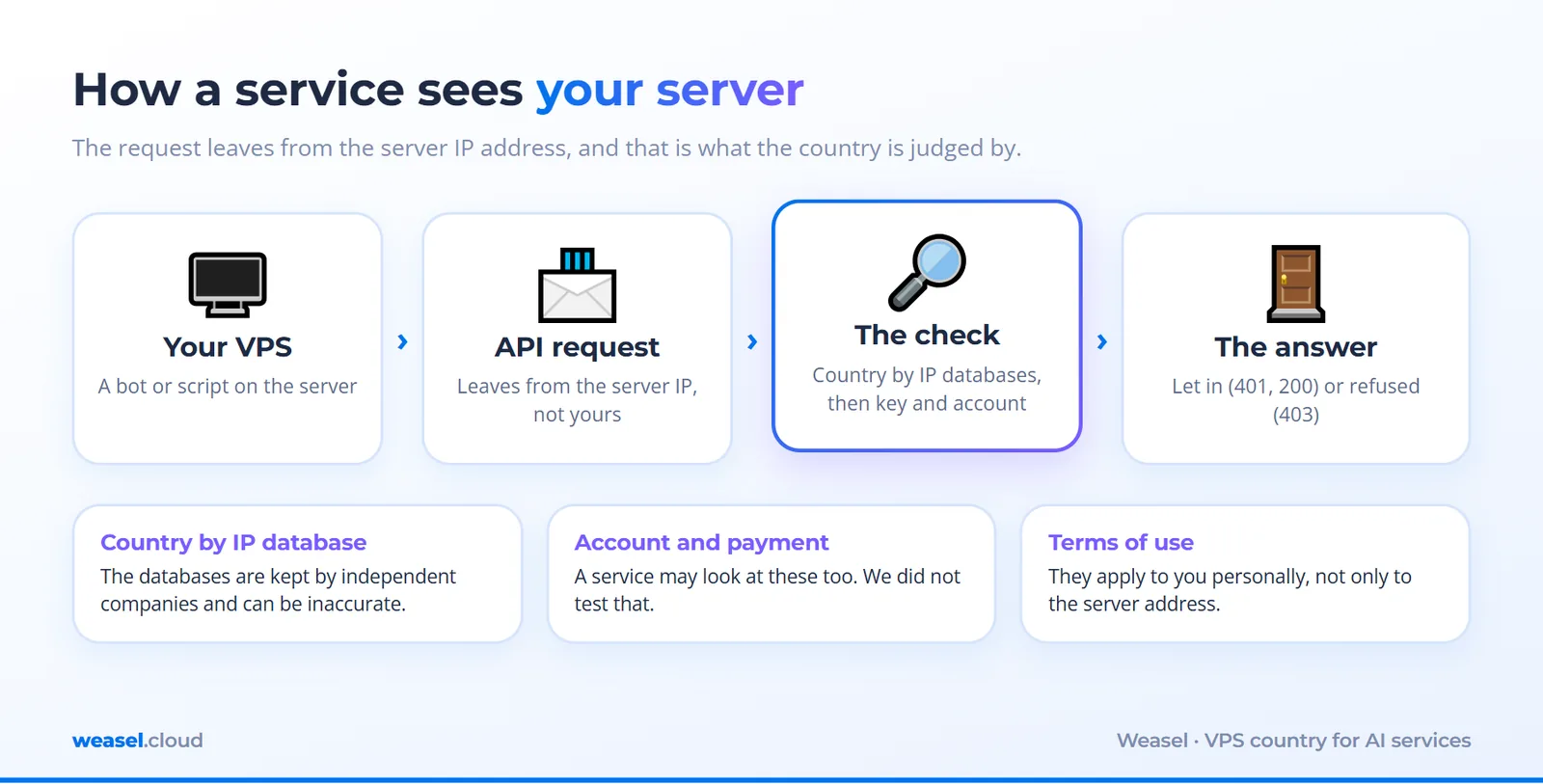
One more thing: official texts do not describe how the service finds out the country. Anthropic writes about physical location, registration and ownership of an organization; OpenAI writes about "access from countries outside the list". So we do not claim that the IP alone decides. We show what you can check yourself and what can go wrong.
What the official lists say
On 2026-11-09 we opened the official pages of four services and looked for the countries where VPS are usually taken in Europe. The countries we checked: the Netherlands, France, Latvia, Estonia, Germany (see the order form for the current Weasel locations: the set changes). The result:
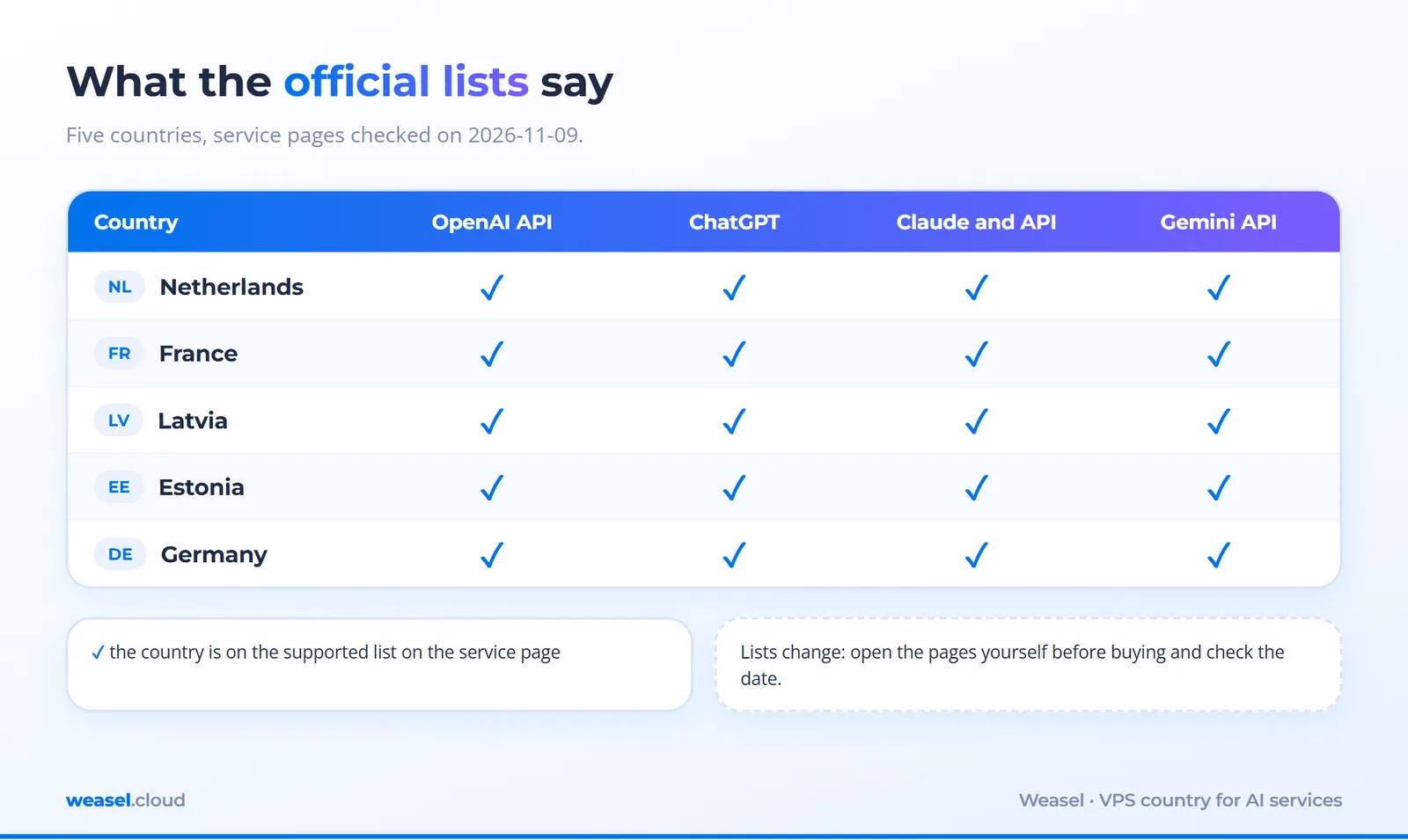
- OpenAI API — all five countries are on the supported list. The API list is a separate page in OpenAI's documentation.
- ChatGPT — all five countries are on the help-centre list.
- Claude and the Anthropic API — all five are on the list. The list is shared by the chat, Claude Code and the API.
- Gemini API — all five are on the list of available regions in Google AI Studio.
The lists change, so open the pages yourself before buying a server: OpenAI API countries, Anthropic countries, Gemini API regions.
How a service "finds out" the country: IP databases and their disagreements
The address your VPS gets is registered to a data centre, and the country in "geolocation databases" (kept by independent companies) is usually inferred from registration data and routing. The databases can be wrong: an address may have been moved recently, and one database knows about it while another does not yet. So it is sensible to ask several databases what they think about your IP.
We asked five sources about the IP of the Weasel test server (the address is masked; the service name in the panel says Germany). Four answered, here they are:
curl -s https://ipinfo.io/185.65.X.X/country
DE
curl -s https://ifconfig.co/country
Germany
curl -s https://api.country.is/185.65.X.X
{"ip":"185.65.X.X","country":"DE"}
curl -s "http://ip-api.com/line/185.65.X.X?fields=country,countryCode,regionName,city"
Germany
DE
Hesse
Frankfurt Am Main
What is written here. curl -s requests a page without the progress meter. Each of the first three returned the country: DE or Germany. The fourth added the region and the city: Hesse, Frankfurt am Main. The fifth source, ipapi.co, cut us off for requesting too often (RateLimited), so we do not count it. The result: all the databases that answered agree with the service name in the panel. This is not always so, which is why you should repeat the check on your own server before you set the bot up.
A real measurement: what the APIs answered from a Weasel server
Next, from the same server, we sent a request to each service's API. Without a key: we do not need to ask the neural network anything, it is enough to see whether the service lets us to the doorstep. It is the same logic as ringing a doorbell: the reply "who is it?" shows that the door is not locked for good.
curl -s -o /dev/null -w "%{http_code}\n" https://api.openai.com/v1/models
401
The command: -o /dev/null throws the response body away, -w "%{http_code}\n" prints only the response code. 401 means "you have not introduced yourself": a key is needed. For our check this is a good sign: the service heard us and is waiting for a key. If the region were closed, OpenAI's documentation suggests we would normally get 403, "country, region, or territory not supported".
curl -s -o /dev/null -w "%{http_code}\n" -X POST -H "content-type: application/json" -H "anthropic-version: 2023-06-01" -d '{}' https://api.anthropic.com/v1/messages
401
For Anthropic the request goes with the POST method, an empty body (-d '{}') and an API version header (-H "anthropic-version: ..."). The answer is 401 and the body says "x-api-key header is required": a key is needed. What code comes back for a closed region is not described in Anthropic's documentation, so we do not promise it would be exactly 403.
curl -s -o /dev/null -w "%{http_code}\n" "https://generativelanguage.googleapis.com/v1beta/models?key=invalid"
400
For Gemini a request with a deliberately wrong key returned 400 and "API key not valid". Be careful here: this answer shows that we reached the service, but it cannot tell whether the service would accept a real key from our country. The phrase "User location is not supported" was not found in the Google documentation we read.
All the results in one table, plus connection time: how long it takes to set up a TCP connection to the nearest service node (time_connect in curl).
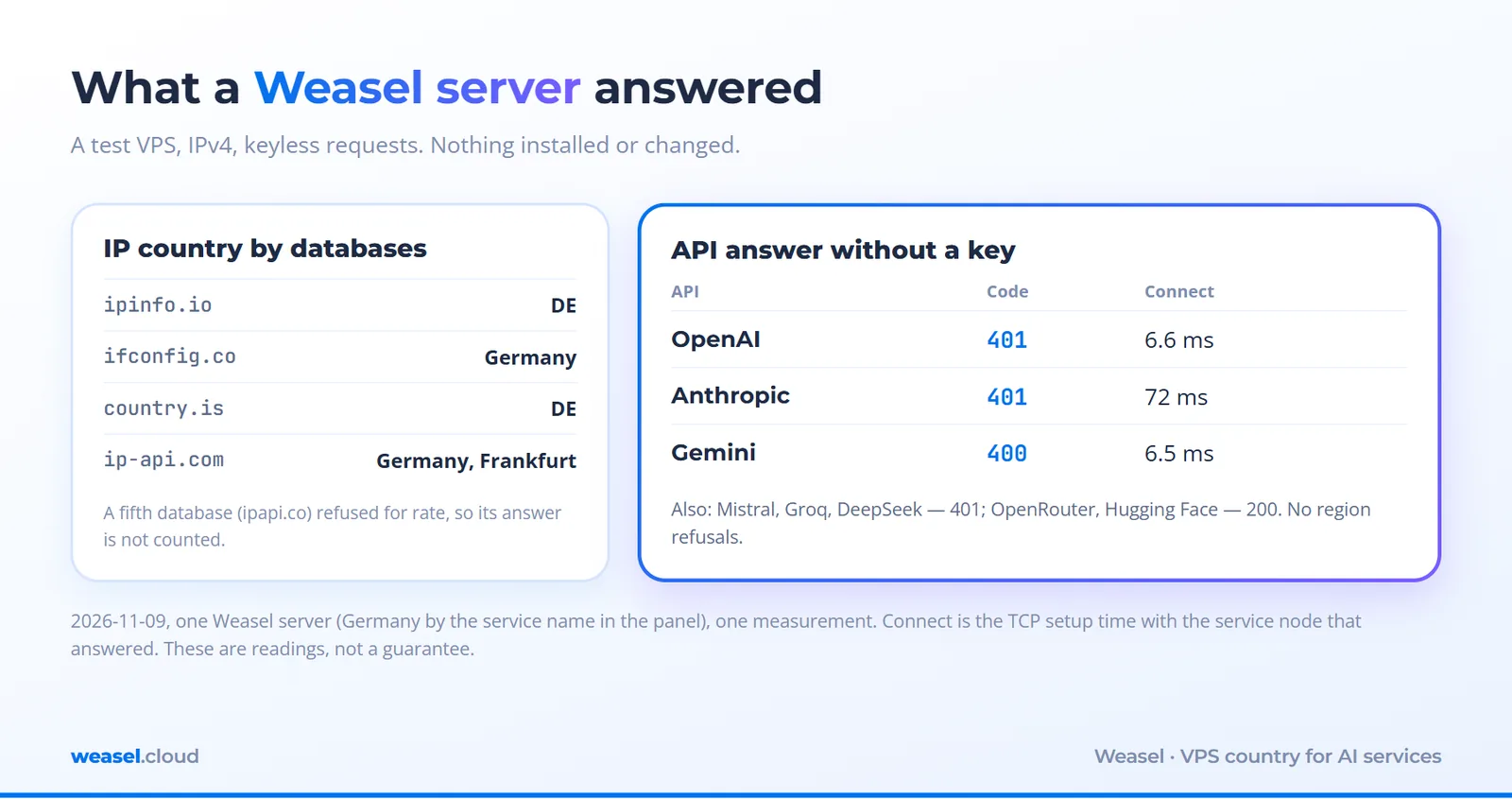
The time in the table is how long it took to set up a connection with the service node that answered, not the path to the data centre that runs the model: the connection to OpenAI and Gemini took 6-7 ms, to Anthropic 72 ms. For a chat bot, where the neural network thinks for seconds, these milliseconds do not decide anything. Something else matters more: the server had no IPv6, so all calls went over IPv4, which means the service saw exactly the IPv4 address.
We also queried five more APIs for comparison: Mistral, Groq and DeepSeek answered 401 (a key is needed), OpenRouter and Hugging Face answered 200 (public model lists that need no key). None of them refused on region.
What the response codes mean
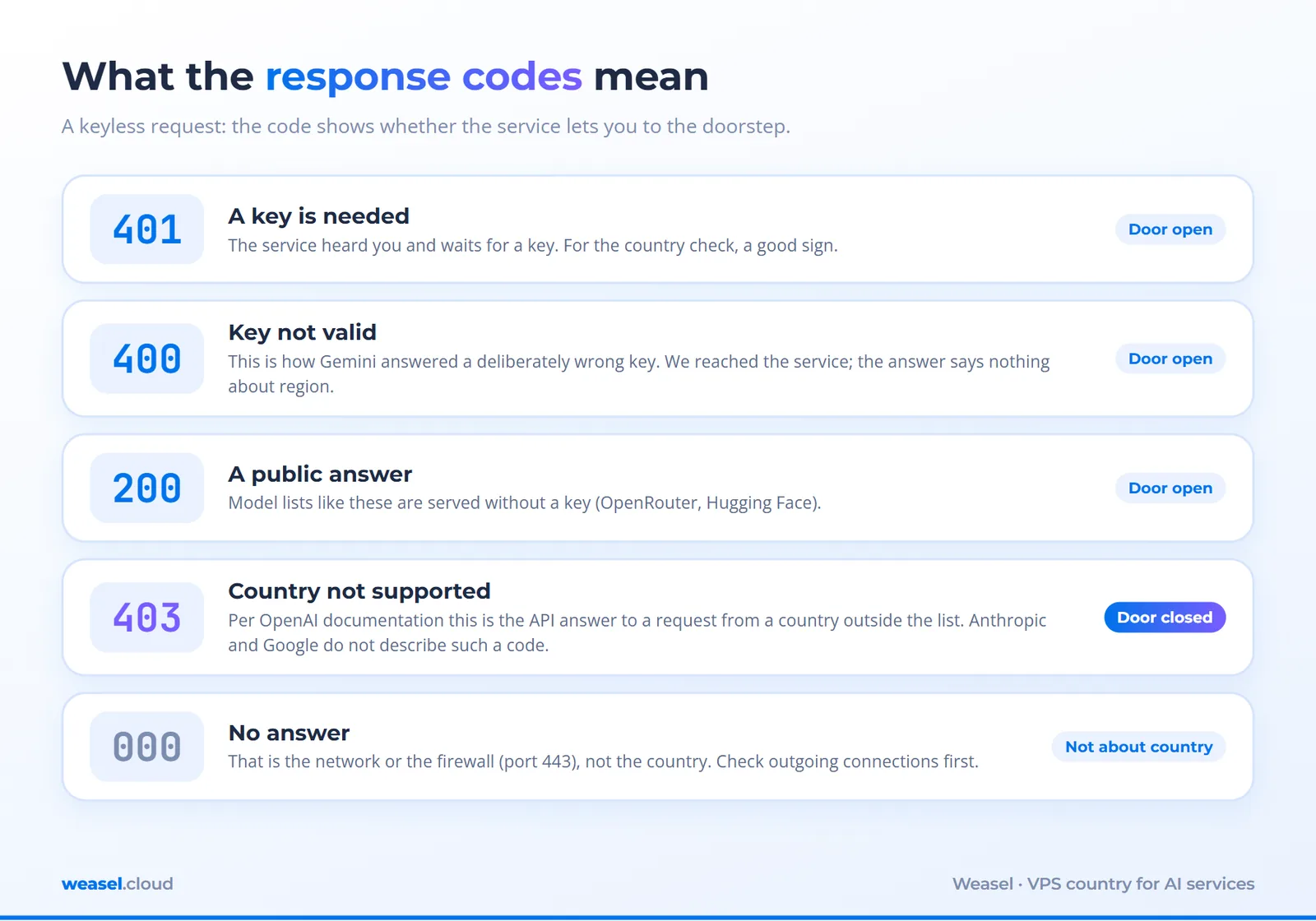
If you remember one thing: 401 and 400 about a key most likely mean "the door is open", while 403 about a country means "the door is closed for you". No answer at all (a hang, 000) is most often a network problem, not a country problem: check whether the firewall lets outgoing connections to port 443 through.
A one-minute check: commands for your own server
Log in to the server over SSH (see the guide for Windows or macOS and Linux) and run this. Nothing is installed or changed, no keys are needed.
echo "IP:"; curl -s -4 https://api.ipify.org; echo
echo "Country by databases:"; curl -s https://ipinfo.io/country; curl -s https://ifconfig.co/country
echo "OpenAI:";    curl -s -o /dev/null -w "%{http_code}\n" https://api.openai.com/v1/models
echo "Anthropic:"; curl -s -o /dev/null -w "%{http_code}\n" -X POST -H "content-type: application/json" -H "anthropic-version: 2023-06-01" -d '{}' https://api.anthropic.com/v1/messages
echo "Gemini:";    curl -s -o /dev/null -w "%{http_code}\n" "https://generativelanguage.googleapis.com/v1beta/models?key=invalid"
What it does: the first line prints the server's external IPv4 (-4 means IPv4 only), the second asks two services about the country, and the other three are those very API requests. The expected result on our server: 401, 401, 400. If you see 403 on the OpenAI request, the service is answering about the country: look at the official list and at the country of your IP.
How to choose the country: four steps
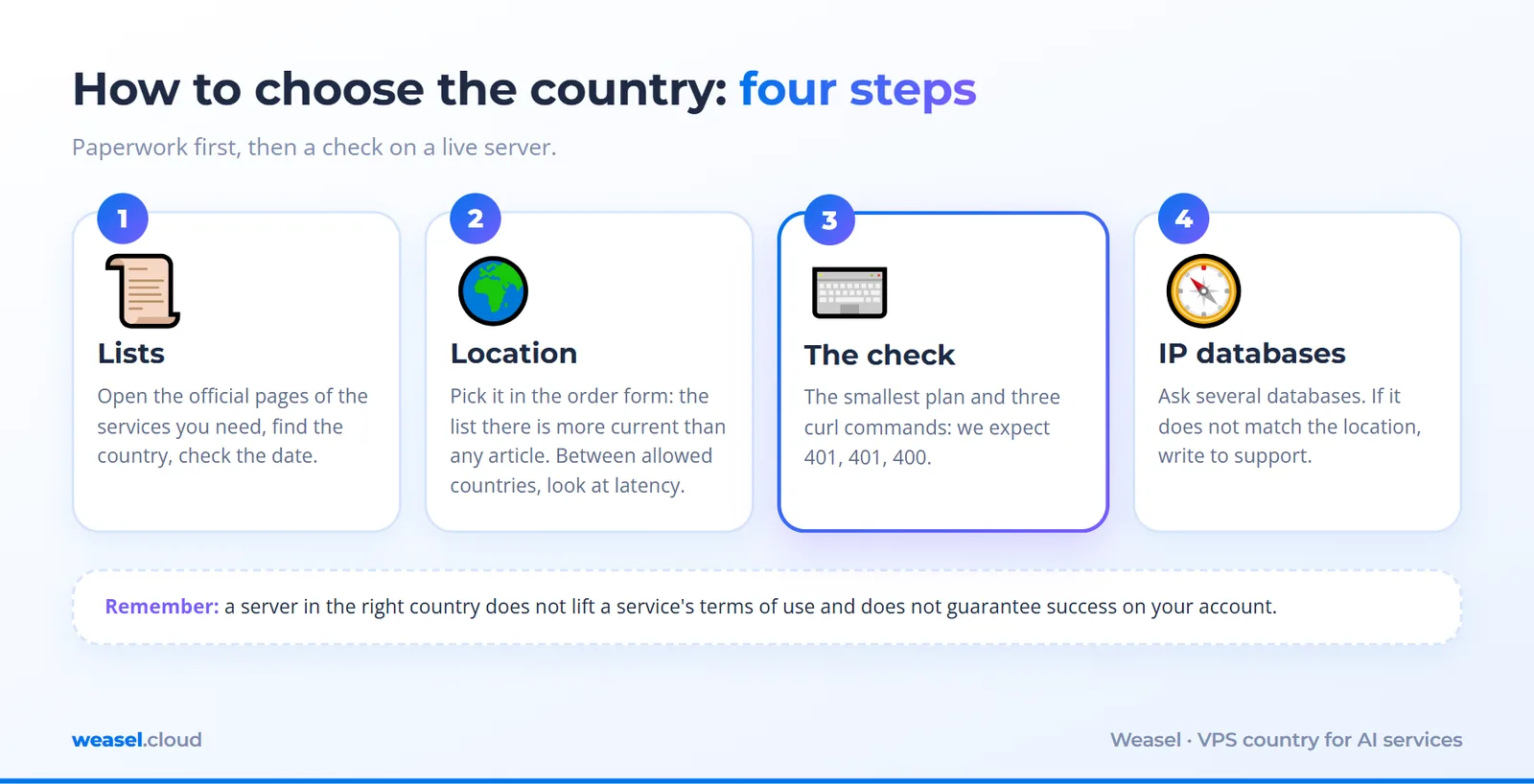
- Check the official lists of the services you need and make sure the server's country is on them. Open the pages yourself and look at the date.
- Pick a location in the order form: the list of countries with servers right now is more current there than in any article. For choosing between countries by latency, see our article "How to choose a VPS location in Europe".
- Order the smallest plan and run the check commands. If the answers look normal, move your project to it. These help: "How to order your first VPS" and "How many vCPU and RAM you need".
- Check the IP databases. If the country in the databases does not match the location, write to support: addresses get moved and databases update with a delay.
What a server in the right country does not solve
- The service's rules apply to you personally. Anthropic, for example, writes about the physical location of the user and about the registration and ownership of an organization. A server in a permitted country does not cancel the terms of use: if you or your company are outside the list, that is a separate situation, and we do not advise getting around a service's rules.
- Account and payment. Services may check these as well as the address. We did not test this: we had no accounts of our own.
- A real key and a real request. A
401without a key does not guarantee that a real request will pass. Our measurement shows that the service saw us, not that everything is fine with your account. - One measurement is one point. We checked one server on one network on 2026-11-09. Another location or another IP range may behave differently, so check your own.
Questions and answers
Which country should I take a VPS in for ChatGPT?
Any country that is on OpenAI's official list on the day you buy. Of the ones we checked, the Netherlands, France, Latvia, Estonia and Germany were on it. After that choose by latency and convenience, then check your own server with the commands above.
Do I need a key to check API access?
No. A request without a key, as in this article, shows that the service heard you: 401 means "a key is needed". A real key is needed only for real requests.
What if the IP databases show a different country?
Ask several databases (the commands are above). If they disagree, write to Weasel support: it happens: addresses are moved between countries and databases update with a delay.
Can I do without an external API?
Yes, you can run open models on the server itself: then no requests go to an external API, and the server country does not affect access to external APIs. But you need memory and CPU, and the plan size depends on the model: choose it for yours.
Does the delay to the API matter?
For a chat bot usually not: the neural network takes seconds to answer, and the difference between 7 and 72 ms on the connection is almost invisible. For streaming and bulk requests you can measure time to first byte with curl -w.
Takeaways
- AI services publish lists of countries; on the lists of OpenAI, Anthropic and Google Gemini API we found the Netherlands, France, Latvia, Estonia and Germany (as of 2026-11-09).
- Between such countries it is better to choose by latency, price and convenience, not "for access".
- The Weasel test server (Germany) answered the keyless requests as expected: 401, 401, 400, with no region refusals.
- Your own server can be checked with three curl commands in a minute, without keys and without installing anything.
- A server in the right country does not lift a service's terms of use and does not guarantee success on your account.
What next
Choose a location by latency in "How to choose a VPS location in Europe", compare plans in "How to choose a VPS server", order your first server with "How to order your first VPS" and close the basic gaps right away with the "Secure your first VPS" checklist.
Read next
Administration18 November 2026
What is an LLM in plain words, and do you need your own VPS for one
Resources6 November 2026
What is a VPS: how a virtual server works and what it is for, in plain words
Network4 November 2026
What Is a DNS Server: How DNS Works, How to Check It and What to Do When It Does Not Respond
Deploy a server in 1 minute
Choose a location and a plan in the client area. The server starts automatically after payment.